Travel Planner Web Application
An interactive web application providing travel planning support and destination recommendations based on personal criteria
Overview & Problem Statement
Planning a 52-day travel plan across Europe and Asia meant balancing hundreds of possible destinations, sequencing dates, weather, entry rules, cost, social atmosphere, work time, and long-haul travel. Researching all of these details, comparing the tradeoffs, and making a decision based on findings made travel planning overwhelming.
Solution
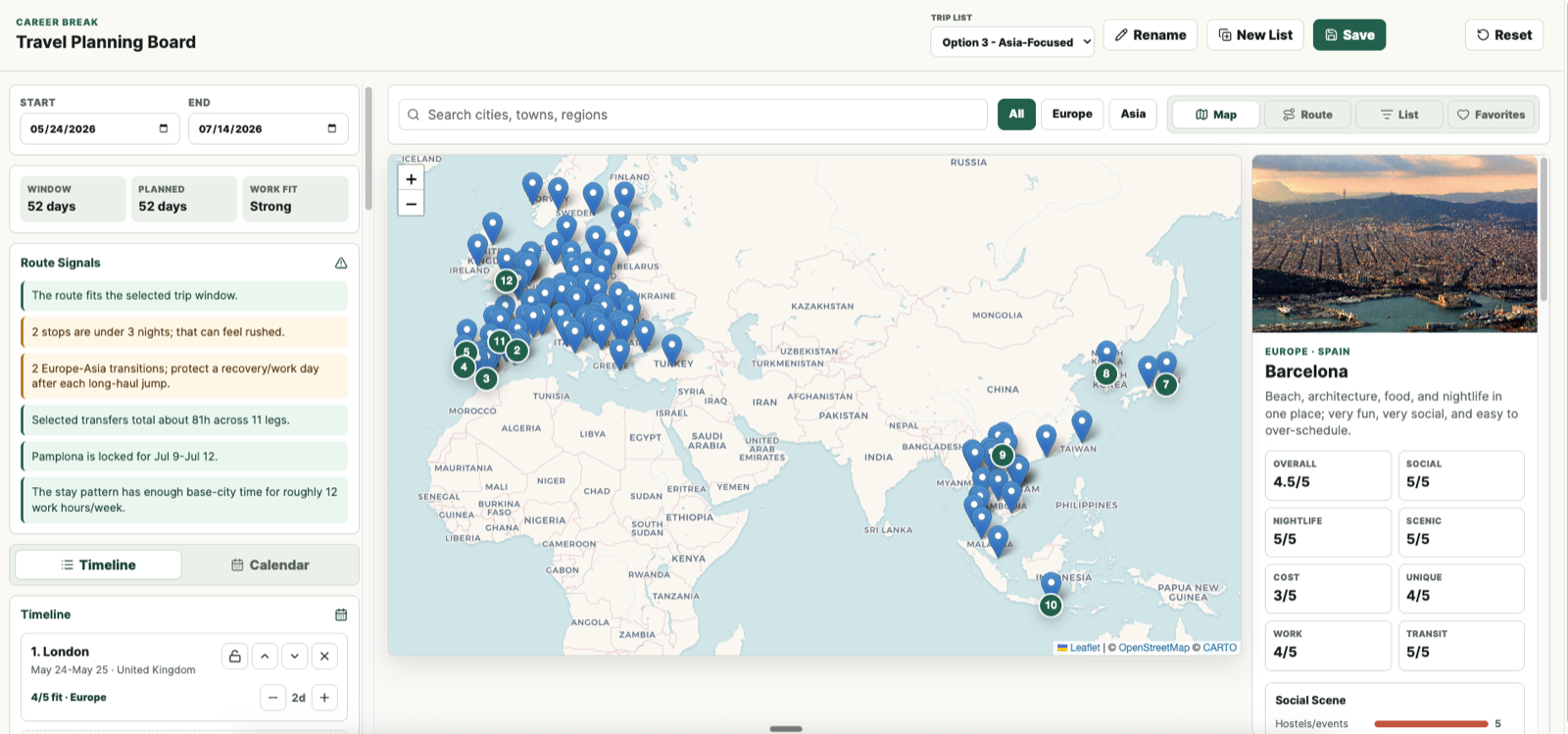
I built a travel planning web application that combines destination research, weighted scoring based on personal criteria, itinerary design, and route checks in one interface. It let me compare options across the factors I cared about, test complete trip scenarios, and see when a route created timing or logistics problems. I kept the production architecture static and hosted it on GitHub Pages to share with friends/family, while a small local server handled editable state and publishing.
Implementation Details
- Defined the decision model: translated personal travel preferences into seven weighted criteria: social scene (20%), nightlife (15%), scenery (20%), cost (15%), uniqueness (15%), workability (10%), and transit (5%).
- Built a curated destination dataset: scraped public travel research for 99 destinations across Europe and Asia, including practical notes on cost, work setup, entry considerations, typical June and July weather, and recommended stay length.
- Made every score explainable: paired each numeric rating with a written rationale, then built ranked views that could sort destinations by overall fit or by an individual factor.
- Modeled the itinerary as a real calendar: added adjustable trip dates, stop lengths, locked date ranges, train or flight choices, route lines, and door-to-door travel estimates. A timeline and weekly calendar showed how each decision changed the full trip.
- Added route guardrails: surfaced unplanned days, overfilled schedules, rushed stops, Europe-to-Asia jumps, inefficient rail selections, locked-date overlaps, calendar gaps, and routes without enough longer bases for roughly 12 hours of project work per week.
- Supported scenario planning: created separate trip lists with independent itineraries and favorites so I could compare a Europe-heavy route, a Japan route, and an Asia-focused route without losing earlier work.
- Kept editing local and publishing simple: stored planner state in JSON, autosaved local changes through a lightweight Node server, and made the Save action commit and push the current lists. GitHub Actions then deployed the static app to GitHub Pages, so I can share the link with friends/family.
- Designed for desktop and mobile: built map, route, calendar, list, favorites, and information views, then adapted them into a focused mobile navigation with a read-only public experience.
Features
- Destination discovery: search and filter 99 destinations through interactive map, ranked list, and favorites views.
- Weighted fit scoring: compare destinations across seven criteria or sort by the factor that matters most.
- Explainable research: review score rationales, weather guidance, cost notes, workability, and entry considerations for each place.
- Scenario planning: create, rename, duplicate, and switch between independent trip options.
- Itinerary timeline: add, remove, reorder, and resize stops while choosing flight or train for each leg.
- Calendar planning: see the route as a week-by-week calendar and insert destinations directly into open dates.
- Locked dates and route signals: protect fixed events and surface gaps, overlaps, rushed pacing, long-haul jumps, and work-fit issues.
- Local-first publishing: autosave edits locally and publish the latest planner state through GitHub and GitHub Pages.
- Responsive mobile views: review the route, map, calendar, ranked destinations, and trip details from a phone.
Outcomes & Impact
- 99 destinations organized into one comparable research set instead of scattered notes and browser tabs.
- A reusable planning workflow that kept research, tradeoffs, and itinerary changes visible as the trip evolved.
- 3 complete itinerary scenarios preserved side by side for structured comparison.
- $0/month production hosting through a static GitHub Pages deployment.
Lessons Learned
- Provide as much context as possible: The destination ranking model worked because I provided it with as much context as possible about my personal preferences and how to rank them.
- Direct the model to ask you questions: Similar to the above, to ensure the LLM understands your ask, or in this case, travel preferences, tell it to ask you questions to ensure it truly understands your preferences. This applies for any build.
- Iterate the product by using the product: The LLM will rarely one-shot the product build to your specs. Become a user of the product and iterate until the product works seamlessly.
Links
- Live site: Career Break Travel Planner
- Repository: justincornetta/travel-planning
Gallery