IPN Member Onboarding Redesign and Analytics
Product experience redesign establishing a clearer member onboarding experience with analytics.
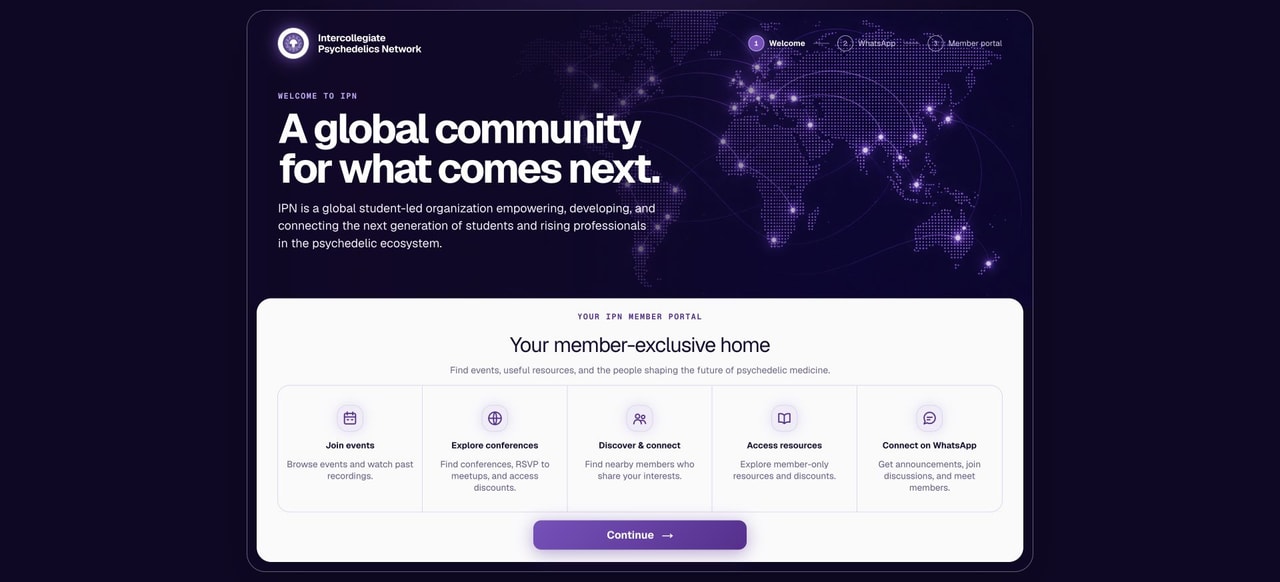
Overview & Problem Statement
Members were registering for the IPN member portal, but many were stopping before completing their profiles or joining our WhatsApp channels. This limited their ability to find other members, learn about programming, and get involved.
Some of the friction came from the tools themselves. WhatsApp required members to find and join individual channels, which were easy to miss. Joining from a computer also introduced extra steps, such as downloading a desktop app.
Incomplete profiles created another problem. We asked members about their goals, what brought them to IPN, and what support they needed. Those answers help us decide what programming to offer, but many did not answer those questions during registration. We could make these questions mandatory, but we wanted registration to be quick, and for members registering on the go, they may not have time for thoughtful reflection. Incomplete profiles also meant a poorer member experience for everyone: no profile pictures, bios, interests, or contact information tied to their profile.
Solution
I redesigned onboarding around the steps most likely to help a new member get started: connect on WhatsApp, complete a profile, learn how to use the portal, and take a first action.
The experience begins with a welcome page explaining IPN and its member benefits. Members then see the WhatsApp channels before reaching the homepage, where a progress tracker guides them through the remaining steps, including profile setup, a portal tour, and taking action by registering for an event or conference or sending a connection request to another member.
I also added an onboarding dashboard so leadership can see members’ progress, identify unfinished steps, and track how they first participate.
Implementation Details
- Decided what mattered first: I prioritized WhatsApp because it is one of our main ways to keep members informed and connected. Profile completion and a short portal tour came next, followed by an opportunity to participate.
- Brought the channels into the portal: I added descriptions of General, Labs Events, and Conferences so members could understand and choose each channel without searching inside WhatsApp.
- Made joining easier across devices: Desktop users can scan a QR code with their phones. Mobile users can open WhatsApp directly. This gives members a path that fits the device they are already using.
- Made profile completion specific: I added a checklist showing the eight things needed to complete a profile. Selecting an unfinished item takes the member to the relevant field.
- Connected the steps: I added progress that members can return to, a short tour explaining the portal’s sections, and a final choice to sign up for an event, indicate conference attendance, or send a connection request.
- Tested the full experience: I checked the flow on desktop and mobile, including profile editing, moving between pages during the tour, and recording the first participation action.
- Added analytics to track onboarding success: I added a dedicated onboarding dashboard showing completion rates, how many steps members have finished, which steps remain incomplete, and completion trends over time. Leadership can filter by registration and activity dates and review each member’s progress. The latest update also identifies the first event signup, conference response, meetup signup, ticket, or connection request that completed a member’s participation step. Each member is counted once under that first action, even if they participate again later.
Features
- Welcome page: Explains what IPN is and what members can access following registration
- WhatsApp channel selection: Shows each channel’s purpose, with QR codes for desktop users and direct links for mobile users.
- Progress tracker: Shows which of the four steps (Join WhatsApp Community, Complete Profile, Portal Tour, and First Participation) are complete and what to do next.
- Profile checklist: Covers a list of profile setup steps with progress completion tracking.
- Portal tour: Introduces the main sections of the member portal and how to use them.
- First participation: Finishes onboarding when a member registers for an event or conference or sends a connection request.
- Onboarding analytics: Shows completion rates, unfinished steps, individual progress, and the first action that completed participation, with date filters and completion trends.
The homepage also highlights events, conferences, member discovery, and newsletter content so members have useful places to go after onboarding.
Outcomes & Impact
- Impact: To be updated after 30 days of data.
- What I’ll measure: Onboarding completion rate, first engagement activity response.
Lessons Learned
Reduce friction by starting with no prior knowledge: I put myself in a new member’s shoes and assumed I knew nothing about IPN or the portal. That helped me see the steps we were expecting members to figure out for themselves, from finding WhatsApp channels to knowing what makes a profile complete. The same thinking inspired the desktop QR codes: someone registering on a computer should have an easy way to continue on their phone.
Design for how members use each device: Members access the portal through web browsers on computers and phones. I needed to think through how they would behave on each. I tailored the joining actions and page layouts to those situations so the next step would be clear whether someone was at a desktop or using their phone.
Links
Gallery