IPN Member Notifications & Leadership Previews
Helping members hear about opportunities through AI automations and leadership previews.
Overview & Problem Statement
I wanted to bring more traffic to the member portal and make it a better, more fun experience for members. Events, discounts, connections, and portal features give members reasons to visit and participate, but only if they know what is available.
Leadership also needed a practical way to promote the opportunities they added. Publishing a meetup or discount in the portal made it available, but members could miss it unless someone sent a separate announcement.
The goal was to give members useful reasons to return without adding ongoing administrative work for leadership to promote those updates. Automated notifications make promotion part of publishing an opportunity, so leadership does not have to manage a separate announcement process each time.
Solution
I expanded the portal’s email notifications using Resend, the service we use to send automated emails. Messages explain what happened and link members to the relevant event, conference, or connection request. Once configured, those notifications run automatically as leadership publishes opportunities or members interact with one another.
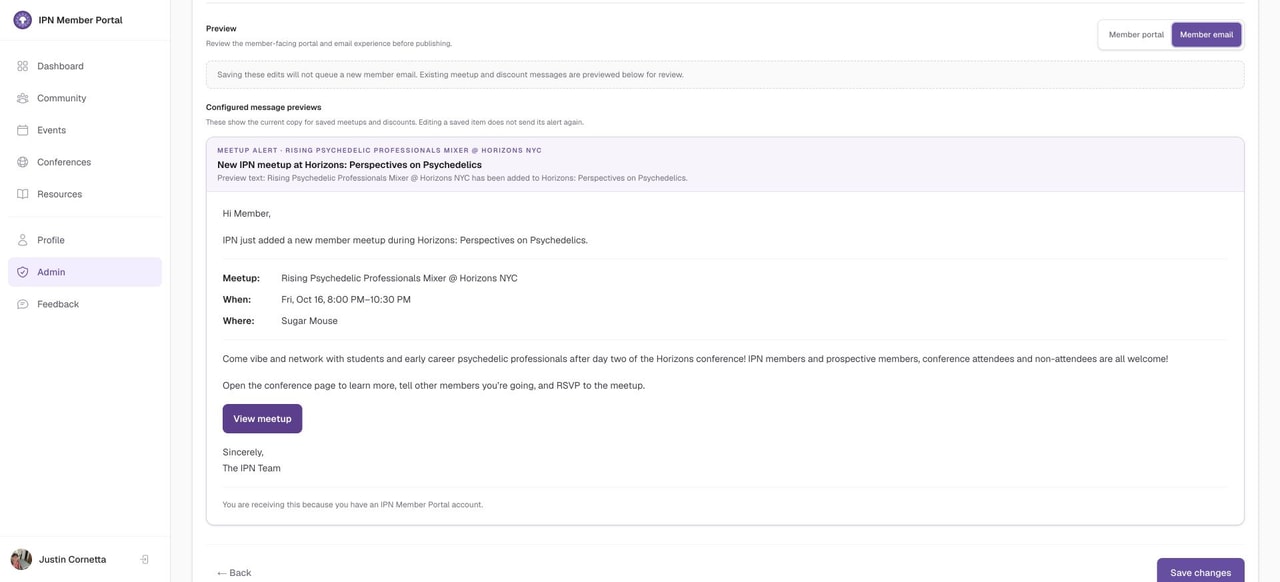
I also added a preview so leadership could review the email content before publishing. The preview explains whether saving a change will send a message, which matters when someone is updating existing content.
Implementation Details
- Chose the reasons to send an email: I focused on new events, received and accepted connection requests, newly published conferences, and newly added meetups or discounts.
- Gave each email a useful next step: Messages provide context and a direct link to view an opportunity or respond to another member.
- Added previews to the publishing process: Leadership can review the portal content and email, including the subject, opening text, details, and action button.
- Controlled how messages are sent: I added a stored list of emails waiting to go out, checks to prevent duplicates, and a limited number of retry attempts when sending fails. Separate modes let us turn sending off, test it, or send to members.
Features
- New event emails: Let members know when an event is published.
- Connection emails: Notify members when someone sends or accepts a connection request.
- Conference emails: Introduce newly published conferences.
- Meetup and discount emails: Highlight newly added gatherings and member benefits.
- Leadership previews: Show what members will see in the portal and receive by email.
- Custom messages: Let leadership adjust the email without changing the portal description.
- Sending controls: Record whether emails are waiting, sent, failed, or skipped, with duplicate checks and testing options.
Outcomes & Impact
- Impact: To be updated after 30 days of data.
- Key measures of engagement: Weekly active users (WAU) and monthly active users (MAU), the number of members actively using the portal each week and month. These will help us understand whether members are returning and engaging with IPN through the portal overall.
- What I’ll also measure: Visits from email, event and conference responses, and connection activity.
Links
Gallery