Assembling My AI Agent Avengers Team
How I made Notion the shared knowledge base and skills registry for all my AI agents.
TL;DR
Problem: There were two problems: (1) keeping my knowledge base organized, accurate, and up-to-date and (2) sharing that knowledge and skills across AI agent harnesses (e.g., Claude Code, Codex, Grok Bot, Muse, and Instinct) without having to constantly repeat myself or duplicate instructions.
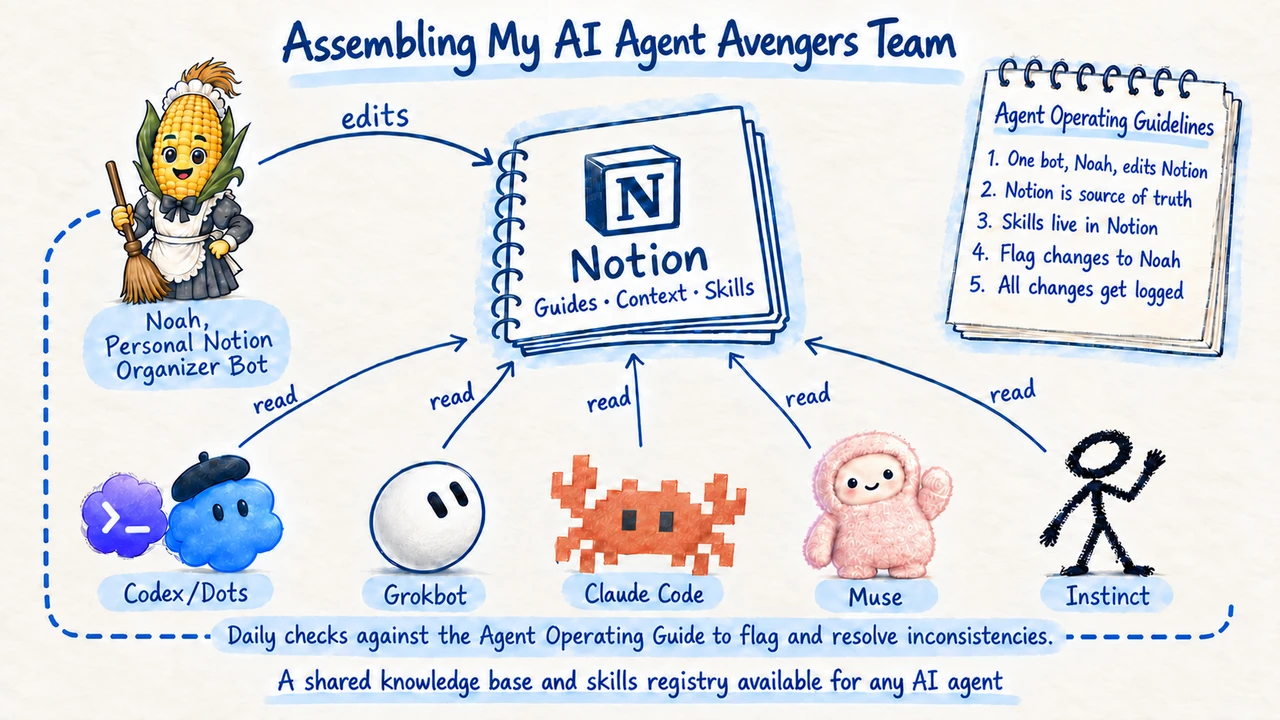
Solution: I set up an operating system with Notion as my shared knowledge base for projects, databases, and skills, with one bot (Noah, my Notion Organizer Grok Bot) allowed to edit its structure, enforce documentation guidelines, and monitor and fix inconsistencies across Notion and my local codebase.
Relevance: It seems like every week a new model or agent harness is introduced. With a shared knowledge base and skills directory, new agents get up to speed faster because they all share the same knowledge and skills. An organized knowledge base also prevents outdated or inaccurate information from feeding into your work, creating a messy output. As the saying goes, garbage in, garbage out.
Overview & Problem Statement
"Every system is perfectly designed to get the results it gets." (Paul Batalden)
The line comes from healthcare quality improvement. Dr. Paul Batalden used it to make a point about hospitals: when patient outcomes are bad, the cause is usually the system around the care, not one person's mistake. If you want different results, you have to change the system.
I think the same applies to AI agents. Garbage in, garbage out: an agent's output is only as good as the system and knowledge around it. This case study is about the system I built for my agents and why I built it.
A quick note on terminology
Before diving in, it's worth distinguishing three terms that are often used interchangeably:
- AI model (LLM): The underlying intelligence that processes information, reasons, and generates responses (e.g., GPT, Claude, Grok).
- AI agent: An AI-powered system that uses a model to pursue goals, make decisions, and execute tasks, often with some degree of autonomy (e.g., Noah, my Notion Organizer Grok Bot).
- Agent harness: The software environment surrounding an agent that provides tools, instructions, memory, permissions, and the infrastructure needed to execute tasks (e.g., Codex, Claude Code, Grok Bot, Muse, Instinct).
These categories can overlap. For example, Codex and Claude Code are often described as AI coding agents, but they also provide the harnesses in which those agents operate.
The distinction matters for this case study because my goal wasn't to build a better AI model or even a single better agent. It was to build a shared system of knowledge and skills that could work across different agent harnesses, regardless of which model or agent I use.
When I started building with AI agents, I worked mainly in Codex. My skills, writing guidance, and project context lived in local files on my computer, which worked well while Codex was the only agent harness I used.
Then Grok Bot and Muse came out. The key difference is where they run. Codex and Claude Code operate from my local computer, while Grok Bot and Muse live on their own computers in the cloud.
Each has its strengths. I enjoy using Grok Bot and Muse on the go, running scheduled tasks without relying on my local computer being on, and building specialized agents to manage my work. Codex and Claude Code, meanwhile, have the most intelligent models in the world and excel at coding and most general knowledge work.
But with multiple agent harnesses in the mix, my context and skills (reusable instructions for repetitive tasks) were isolated across different environments. I kept repeating myself, and I wasn't getting the most out of any of them. With new models and capabilities coming out seemingly every week, I needed a system where knowledge and skills are shared, stay up to date, and give new agents a quick onboarding ramp.
Solution
I made Notion my agent-agnostic knowledge base and built a skills directory that all agent harnesses share.
The important pieces of this knowledge base are:
- Agent Operating Guide (AOG): a short set of standing rules every agent reads at the start of a session, covering who can edit, how skills work, and what belongs in Notion vs. on my computer.
- Workspace Guide: how my personal and work Notion workspaces are structured and where project homes live.
- Shared Context: shared knowledge about myself and how I like to work, so every agent works from the same set of guidelines (e.g., writing style instructions).
- Skills registries (Personal and Work): the reusable skill recipes live here, with full instructions. Local Codex, Grok Bot, or Muse copies are short pointers back to Notion.
- Project homes: each with a short “start here” so agents land in the right place and have the appropriate project context.
- Project-specific pages & databases: project-specific content and databases for general knowledge work live under their respective project homes.
- One editor: Noah, my Notion Organizer Grok Bot, owns structure and rules; a few bots get minor exceptions, and everyone else flags changes to Noah, who implements them during his daily scan.
- Code base: For projects that need code, it lives on GitHub with a local copy on my computer.
Every agent starts with the agent operating guide. Local AGENTS.md files on my computer also point to it, so Codex, Grok Bot, Muse, Instinct, and whatever comes next follow the same rules without copying the full guide into every chat window.
My skills directory in Notion holds every skill, so any agent can use it no matter where I first built it.
To keep Notion clean and in sync with local files, Noah, my Notion Organizer, is the only agent allowed to edit my Notion across both my Personal and Work workspaces (note: I do have a few exceptions to this rule for specialized agents for specific tasks). If an agent operating within another agent harness, like Codex, wants to make changes to the knowledge base or skills registry, it creates a Markdown file with specific naming conventions that Noah picks up during his daily scan each morning, implements those changes in Notion, and notifies me.*
During his daily scan, Noah also checks that each active skill stays in sync with its local copy, that projects in Notion match my local folder system, and that every agent harness shares the same setup prompt.
Here’s an example of where I used Codex to prep for an upcoming meeting with my agenda-creator skill, which Grok Bot originally built. Then I asked Codex to change the skill, and it followed the rules: instead of editing Notion, it left an update request for Noah, who picked it up and implemented it during his daily scan (screenshots of the example below).
Skill Creator Example
Using the agenda-creator skill across Codex and Grok Bot.
*While the process of creating a Markdown file for any change requests works for routing Notion documentation and skills changes to Noah to implement in Notion, it is likely not the best solution. Another potential solution I will explore is https://agenttincan.com/, which allows agent harnesses to talk to each other directly (e.g., Codex to Grok Bot direct communication), but that is for another time and case study!
Why it matters
It seems like every week a new AI model, agent, or agent harness is introduced. Each comes with its own strengths and weaknesses, and getting started often means rebuilding context about you, your business, and your goals. This makes switching or onboarding a new agent a tedious process and wastes your valuable time.
And without a reliable way to identify outdated information, agents may confidently act on stale context, producing inaccurate or misleading outputs. For one person, it’s probably manageable, but for a company pointing an agent at years of internal wikis and process docs, it could mean confident answers built on rules that no longer apply. Again, garbage in, garbage out, but at scale.
Understanding these points is crucial.
"Every system is perfectly designed to get the results it gets," so take the time to understand how agents operate and establish the infrastructure right the first time. That cuts down on cleanup later, and it's what lets agents actually help run your business instead of creating more work, without being reliant on any single agent harness.
Get that right, and you can assemble an Avengers team of AI agents ready to take on Thanos!
Video Credit: @Kavya_codez on X (https://x.com/Kavya_codez/status/2105537217515196642?s=20)
Gallery